Product Features
1 Product Specifications
| Name | myGripper H100 Three-Fingered Dexterous Hand |
|---|---|
| Grip range | 0 - 130mm |
| Finger Count | 3 fingers, corresponding to the thumb, index finger, and ring finger of the human hand respectively |
| Service life | 100,000 times or more |
| Movable joints | 6 |
| Motor type | Servo motor, supports current, position, and speed control |
| Weight | 780g |
| Rated load | 500g |
| Power Supply | 24V 2A |
| Fixing method | Screw fixation |
| Operating environment requirements | Normal temperature and pressure |
| Control Interface | RS485 Control |
Pin sequence description
Pins 1 and 5 connect GND to 24V, Pins 2 and 3 are for controlling IO input, Pins 6 and 7 are for IO output, and Pins No. 4,8 is for 485 communication, which is used for receiving and sending instructions with the dexterous hand
Note:
To ensure the safe operation of the dexterous hand device, please strictly follow the wire labels to distinguish the wire sequence. In case of missing, detached, or forgotten wire labels, please immediately contact the technical team through official channels. If damage occurs due to non-standard operation, our company will bear the corresponding maintenance costs according to the contract terms.
2 Specification parameter table of main controller
| Name | ESP32 |
|---|---|
| Core parameters | 240MHz dual core. 600 DMIPS, 520KB SRAM. Wi-Fi, dual mode Bluetooth |
| Flash | 4MB |
3 Python Development
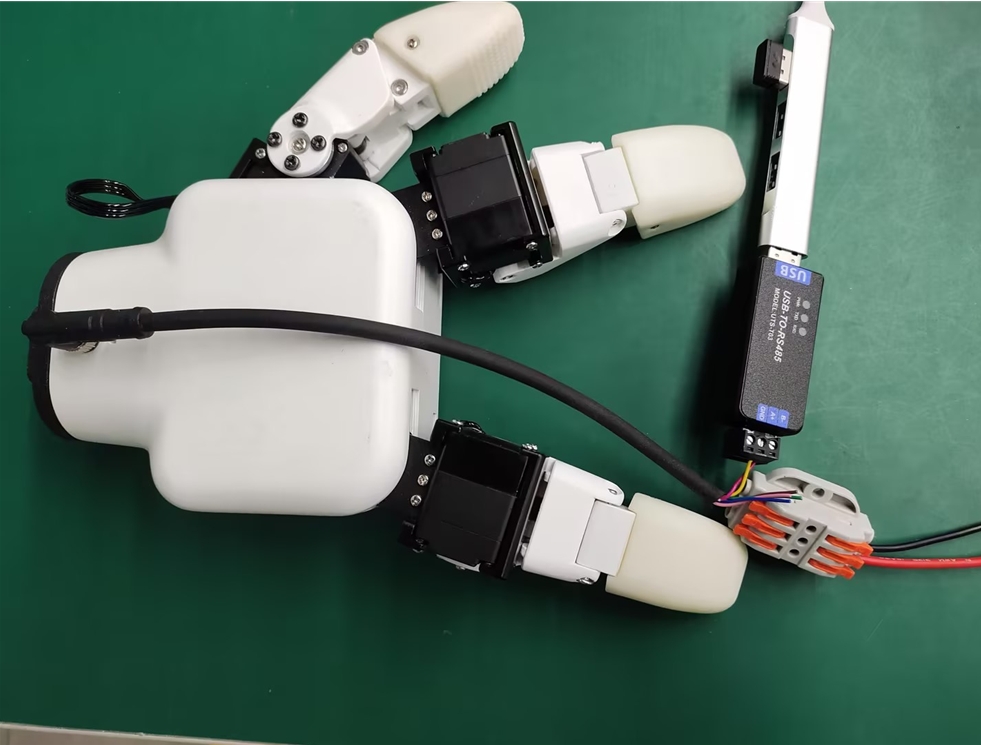
Wiring of USB-485 module:
Connect four wires: 24V, GND, 485_A (T/R+, 485+), and 485_B (T/R-, 485-) to the dexterous hand end. The power supply is a 24V DC regulated power supply. Plug the USB port of the module into the USB interface of the computer
485A connected to 485 to USB converter module A+;
485B connected to 485 to USB converter module B-;
Connect 24V to the positive terminal of a 24V DC regulated power supply
GND is connected to the negative terminal of a 24V DC regulated power supply
Driver library installation Click to download the driver library
Installation of serial port dependency libraries
Execute the following command on the computer terminal to install the dependent libraries
pip install pyserial
API Description
get_gripper_firmware_version()
- Function: Obtain the major version number of the gripper firmware
- Parameters: None
- Return:
(int)firmware major version number
get_gripper_modified_version()
- Function: Obtain the minor version number of the gripper firmware
- Parameters: None
- Return:
(int)firmware minor version number
get_gripper_gripper_Id()
- Function: Obtain gripper ID
- Parameters: None
- Return:
(int)gripper ID
get_gripper_gripper_baud()
- Function: Get gripper baud rate
- Parameters: None
- Return:
(int)0-50: 1152001: 10000002: 576003: 192004: 96005: 4800
get_gripper_joint_angle(id)
- Function: Obtain current position data information of the gripper
- Parameters:
id:(int)gripper joint ID, value range1-6 - Return:
(int)Current position data of the gripper joint ID
get_gripper_status()
- Function: Obtain the current status of the gripper
- Parameters: None
- Return:
(int)0-30: Exercising "-1: Motion stopped, no object detected" "-2: Stop moving, an object has been detected" "-3: After detecting the object being clamped, it falls off" get_gripper_joint_speed(id)
- Function: Get the current speed of the gripper joint ID
- Parameters:
id:(int)gripper joint ID, value range1-6 - Return:
(int)The current speed of the gripper joint ID get_gripper_joint_P(id)
- Function: Obtain the P value of the PID for the gripper joint ID
- Parameters:
id:(int)gripper joint ID, value range1-6 - Return: P value of PID for the gripper joint ID, which is an integer
get_gripper_joint_I(id)
- Function: Obtain the I value of the PID for the gripper joint ID
- Parameters:
id:(int)gripper joint ID, value range1-6 - Return:
(int)I value of PID for the gripper joint ID get_gripper_joint_D(id)
- Function: Obtain the D value of the PID for the gripper joint ID
- Parameters:
id:(int)gripper joint ID, value range1-6 - Return: D value of PID for the gripper joint ID, which is an integer
get_gripper_joint_cw(id)
- Function: Obtain the clockwise operable error of the gripper joint ID
- Parameters:
id:(int)gripper joint ID, value range1-6 - Return:
(int)Clockwise operational error of the gripper joint ID get_gripper_joint_cww(id)
- Function: Obtain the counterclockwise operable error of the gripper joint ID
- Parameters:
id:(int)gripper joint ID, value range1-6 - Return:
(int)Counterclockwise operable error of the gripper joint ID get_gripper_joint_mini_pressure(id)
- Function: Obtain the minimum activation force for the gripper joint ID
- Parameters:
id:(int)gripper joint ID, value range1-6 - Return:
(int)The minimum activation force for the gripper joint ID get_gripper_joint_mini_pressure(id)
- Function: Obtain the minimum activation force for the gripper joint ID
- Parameters:
id:(int)gripper joint ID, value range1-6 - Return:
(int)The minimum activation force of the gripper joint ID get_gripper_angles()
- Function: Obtain the angles of the six joints of the gripper
- Parameters:
id:(int)gripper joint ID, value range1-6 - Return:
(list)of angles of the 6 joints of the gripper set_gripper_Id(value)
- Function: Set gripper ID number
- Parameters:
value:(int)gripper ID, with a value range of1-254
- Return:
(int)0-10: Failure1: Success set_gripper_baud(value)
- Function: Set gripper baud rate
- Parameters:
value:(int)gripper baud rate, with a value range of0-50: 1152001: 10000002: 576003: 192004: 96005: 4800
- Return:
(int)0-10: Failure1: Success
set_gripper_enable(value)
- Function: Set the enabling status of the gripper claw
- Parameters:
value:(int)enable state, with a value range of0-1"-0: Disable" "-1: enable"
- Return:
(int)0-10: Failure1: Success <!-- ### set_gripper_value(value,speed)
- Function: Set the gripper to rotate to the specified position at a specified speed
- Parameters:
value:(int)position, with a value range of0-100speed:(int)speed, with a value range of1-100
- Return:
(int)0-10: Failure1: Success --> set_gripper_joint_calibration(id)
- Function: Set gripper joint ID zero position calibration
- Parameters:
id:(int)gripper joint ID, value range1-6 - Return:
(int)0-10: Failure1: Success set_gripper_joint_P(id,value)
- Function: Set the P value of the PID for the gripper joint ID
- Parameters:
id:(int)Joint ID, with a value range of1-6value:(int)P value, with a value range of0-254
- Return:
(int)0-10: Failure1: Success set_gripper_joint_I(id,value)
- Function: Set the I value of the PID for the gripper joint ID
- Parameters:
id:(int)Joint ID, with a value range of1-6value:(int)I value, with a value range of0-254
- Return:
(int)0-10: Failure1: Success set_gripper_joint_D(id,value)
- Function: Set the D value of the PID for the gripper joint ID
- Parameters:
id:(int)Joint ID, with a value range of1-6value:(int)D value, with a value range of0-254
- Return:
(int)0-10: Failure1: Success set_gripper_joint_cw(id,value)
- Function: Set the clockwise operational error tolerance for the gripper joint ID
- Parameters:
id:(int)Joint ID, with a value range of1-6value:(int)error, with a value range of0-16
- Return:
(int)0-10: Failure1: Success set_gripper_joint_cww(id,value)
- Function: Set the counterclockwise operational error of the gripper joint ID
- Parameters:
id:(int)Joint ID, with a value range of1-6value:(int)Error, with a value range of0-16
- Return:
(int)0-10: Failure1: Success set_gripper_joint_mini_pressure(id,value)
- Function: Set the minimum activation force for the gripper joint ID
- Parameters:
id:(int)Joint ID, with a value range of1-6value:(int)Minimum activation force, with a value range of0-254
- Return:
(int)0-10: Failure1: Success set_gripper_joint_torque(id,value)
- Function: Set the torque of the gripper joint ID
- Parameters:
id:(int)Joint ID, with a value range of1-6value:(int)torque, with a value range of0-100
- Return:
(int)0-10: Failure1: Success set_gripper_joint_speed(id,speed)
- Function: Set the speed of the gripper joint ID
- Parameters:
id:(int)Joint ID, with a value range of1-6speed:(int)speed, with a value range of1-100
- Return:
(int)0-10: Failure1: Success set_gripper_angles(angles,speed)
- Function: Set the full joint angle of the gripper claw
- Parameters:
angles:(list)6 joint angles, with each joint angle having a value range of0-100speed:(int)speed, with a value range of1-100
- Return:
(int)0-10: Failure1: Success set_gripper_action(value)
- Function: Set the pinching action of the gripper claws
- Parameters:
value:(int)action, with a value range of0-3"-0: Index finger and thumb pinched together" "-1: Pinch the middle finger and thumb together" "-2: Hold with three fingers" "-3: Two-finger grip"
- Return:
(int)0-10: Failure1: Success set_gripper_pose(pose,value,flag)
- Function: Set the pinching action and opening/closing degree of the gripper claws
Parameters:
pose:(int)action, with a value range of0-4"-0: Return all joints to zero" "-1: Pinch with index finger and thumb" "-2: Pinch with the middle finger and thumb" "-3: Pinch with the middle finger and index finger" "-4: Three-finger pinch"value:(int)Opening degree, value range0-15, closing degree, the higher the level, the more closed it isflag:(int)Idle flag. When the flag is set to 1, the idle finger can be freely controlled
Return:
(int)0-10: Failure1: Success Test program
from MyHand import MyGripper_H100
import time
if __name__=="__main__":
hand=MyGripper_H100("COM8")
hand.set_gripper_pose(0,0)
time.sleep(2)
hand.set_gripper_pose(1,5)
time.sleep(5)
hand.set_gripper_pose(2,5)
time.sleep(5)
hand.set_gripper_pose(3,5)
time.sleep(5)
hand.set_gripper_pose(4,15)
time.sleep(5)
hand.set_gripper_pose(0,0)
time.sleep(2)