环境搭建
安装ROS环境
参考 ROS1 环境搭建
mycobot_ros安装
执行下面命令安装 ultraArm P1 ROS 代码:
$ cd ~/catkin_ws/src
$ git clone -b ultraarm-P1 https://github.com/elephantrobotics/mycobot_ros.git
$ cd ~/catkin_ws
$ catkin_make
$ source ~/catkin_ws/devel/setup.bash
$ sudo echo 'source ~/catkin_ws/devel/setup.bash' >> ~/.bashrc
机械臂的控制
注意:pymycobot 驱动库的版本必须大于4.0.5
使用前准备
在使用案例功能之前,请先确认以下硬件和环境准备齐全:
硬件设备
- ultraArm P1 机械臂
- 电源适配器
- USB Type-C串口线
软件与环境
- PC虚拟机 ubuntu 20.04系统
- 已安装 Python 3.6 及以上版本
- 已安装
pymycobot库(通过pip install pymycobot终端命令安装) 确保 ultraArm P1 已正确接通电源、串口线,并且虚拟机系统能检测到串口号。
验证:验证机械臂串口是否存在,终端输入:
ls /dev/tty*如果输出的串口信息有
/dev/ttyACM*或者/dev/ttyUSB*,表示串口已被检测到。串口权限: 如果串口存在,需要赋予可执行权限:
sudo chmod 777 /dev/ttyUSB*
# 或者
sudo chmod 777 /dev/ttyACM*
1 滑块控制
打开命令行并运行:
roslaunch ultraarm_p1 slider_control.launch
打开 rviz 和一个滑块组件,您将看到如下界面:
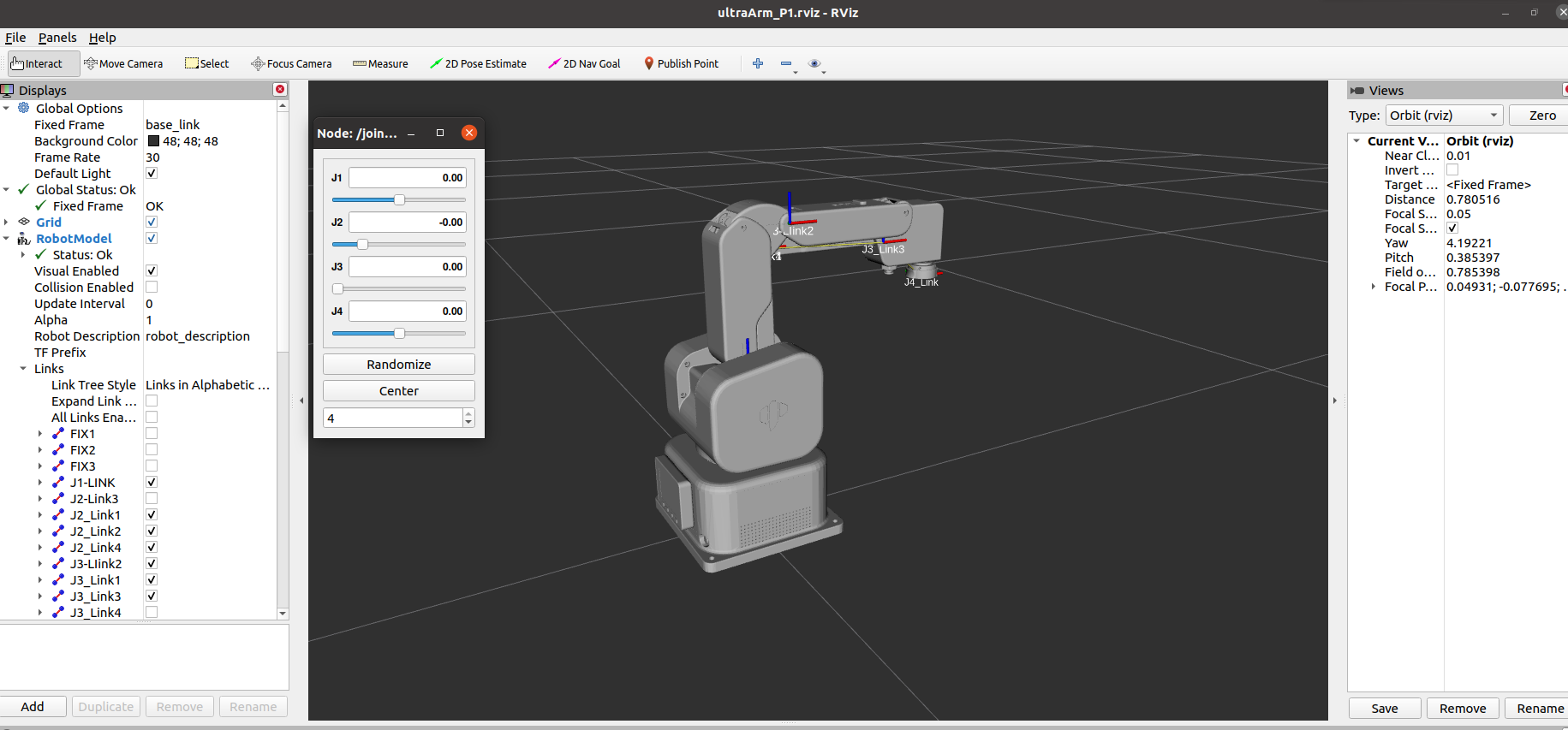
然后你就可以在 rviz 中 控制模型,通过拖动滑块使其移动。如果想让真实的机械臂随着模型移动,则需要打开另一个命令行并运行:
# 默认串口名为"/dev/ttyUSB0",波特率为1000000.
rosrun ultraarm_p1 slider_control.py _port:=/dev/ttyUSB0 _baud:=1000000
请注意:由于在命令输入的同时机械臂会移动到模型目前的位置,在您使用命令之前请确保 rviz 中的模型没有出现穿模现象
不要在连接机械臂后做出快速拖动滑块的行为,防止机械臂损坏
2 模型跟随
除了上述控制外,我们还可以让模型跟随真实的机械臂移动。
打开命令行,启动ros节点:
roscore
然后打开新的命令行并运行:
# 默认串口名为"/dev/ttyUSB0",波特率为1000000.
rosrun ultraarm_p1 follow_display.py _port:=/dev/ttyUSB0 _baud:=1000000
运行成功后, 需要按住机器末端LED按钮才能拖拽关节移动,终端输出信息如下
[INFO] [1782124921.575586]: Please press the LED button at the end of the machine to drag the joint.
请按下机器末端LED按钮进行关节拖拽运动

[INFO] [1782124921.583662]: Publishing ...
最后打开另一个命令行并运行:
roslaunch ultraarm_p1 follow_display.launch
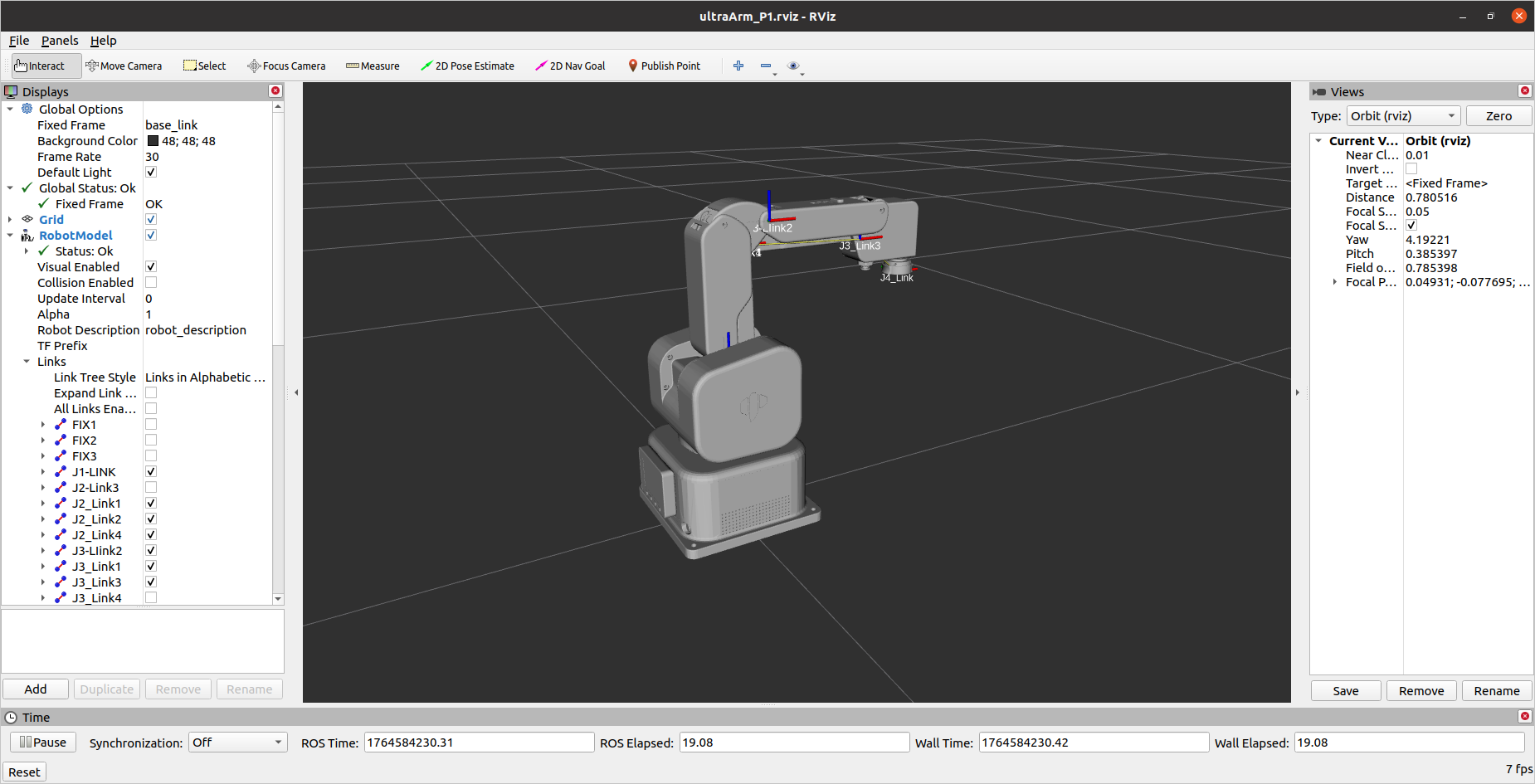
它将 打开 rviz,显示模型跟随效果。此时拖动真实机械臂关节,仿真模型将会跟随真实机械臂运动。
3 GUI 控制
在前述内容的基础上,本软件包还提供了一个简单的图形用户界面(GUI)控制界面。连接到 ultraArm。
打开命令行:
# 默认串口名为"/dev/ttyUSB0",波特率为1000000.
roslaunch ultraarm_p1 simple_gui.launch port:=/dev/ttyUSB0 baud:=1000000
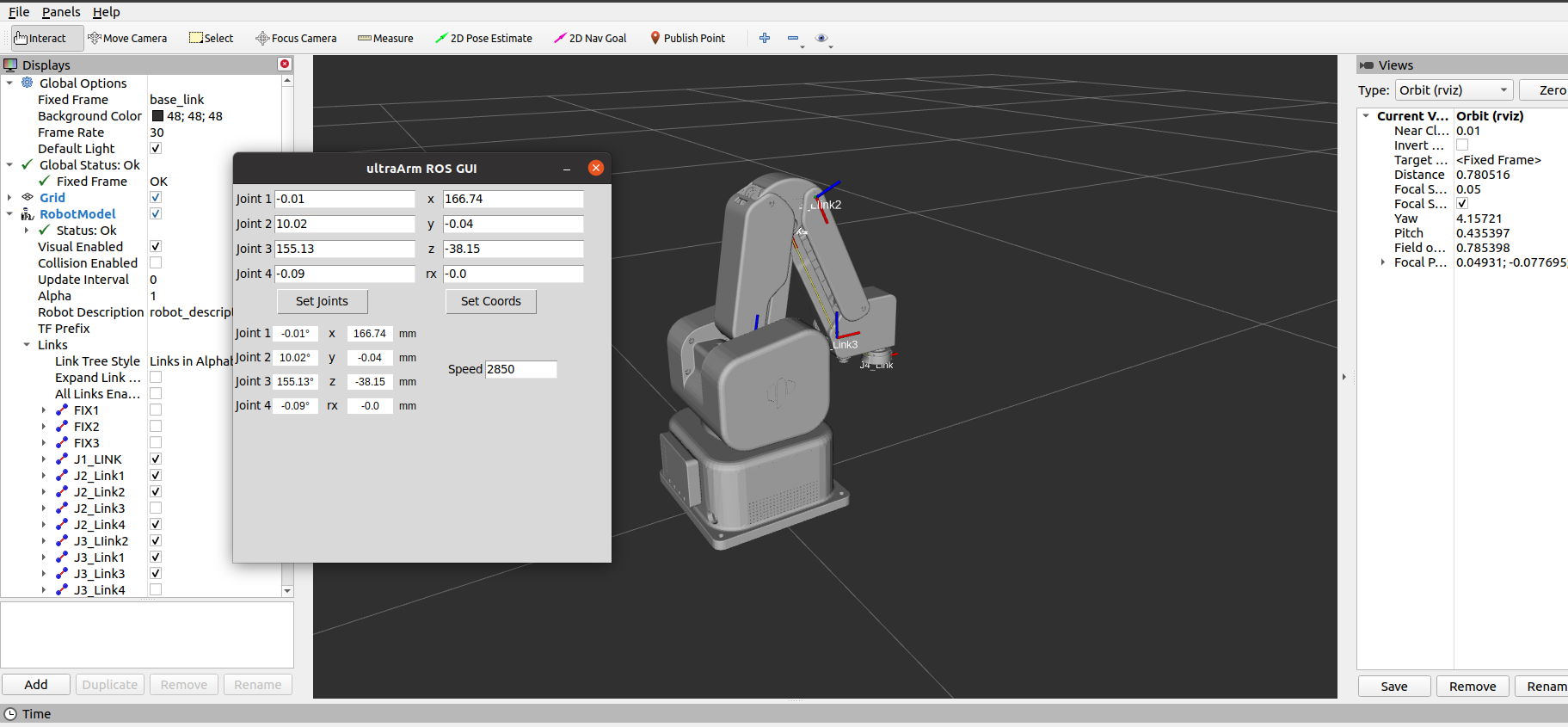
运行成功后,终端信息输出如下:
SUMMARY
========

PARAMETERS
 * /mycobot_services/baud: 1000000
 * /mycobot_services/port: /dev/ttyUSB0
 * /robot_description: <?xml version="1....
 * /rosdistro: noetic
 * /rosversion: 1.16.0

NODES
  /
    mycobot_services (ultraarm_communication/mycobot_services.py)
    real_listener (ultraarm_p1/listen_real.py)
    robot_state_publisher (robot_state_publisher/robot_state_publisher)
    rviz (rviz/rviz)
    simple_gui (ultraarm_p1/simple_gui.py)

ROS_MASTER_URI=http://localhost:11311

process[robot_state_publisher-1]: started with pid [128931]
process[rviz-2]: started with pid [128932]
process[mycobot_services-3]: started with pid [128933]
process[real_listener-4]: started with pid [128939]
process[simple_gui-5]: started with pid [128941]
Current pymycobot library version: 4.0.6b1+p1
pymycobot library version meets the requirements!
[INFO] [1764746055.634703]: Starting ultraArm service node...
[INFO] [1764746055.638701]: /dev/ttyUSB0,1000000

ultraArm P1 Status
--------------------------------
Joint Limit:
    joint 1: -165 ~ +165
    joint 2: -18 ~ +85
    joint 3: +89 ~ +200
    joint 4: -179 ~ +179

[INFO] [1764746057.175403]: Services are ready
然后在GUI界面输入相关角度和坐标信息,点击对应按钮,即可实现真实机器与仿真模型的同步运动
4 键盘控制
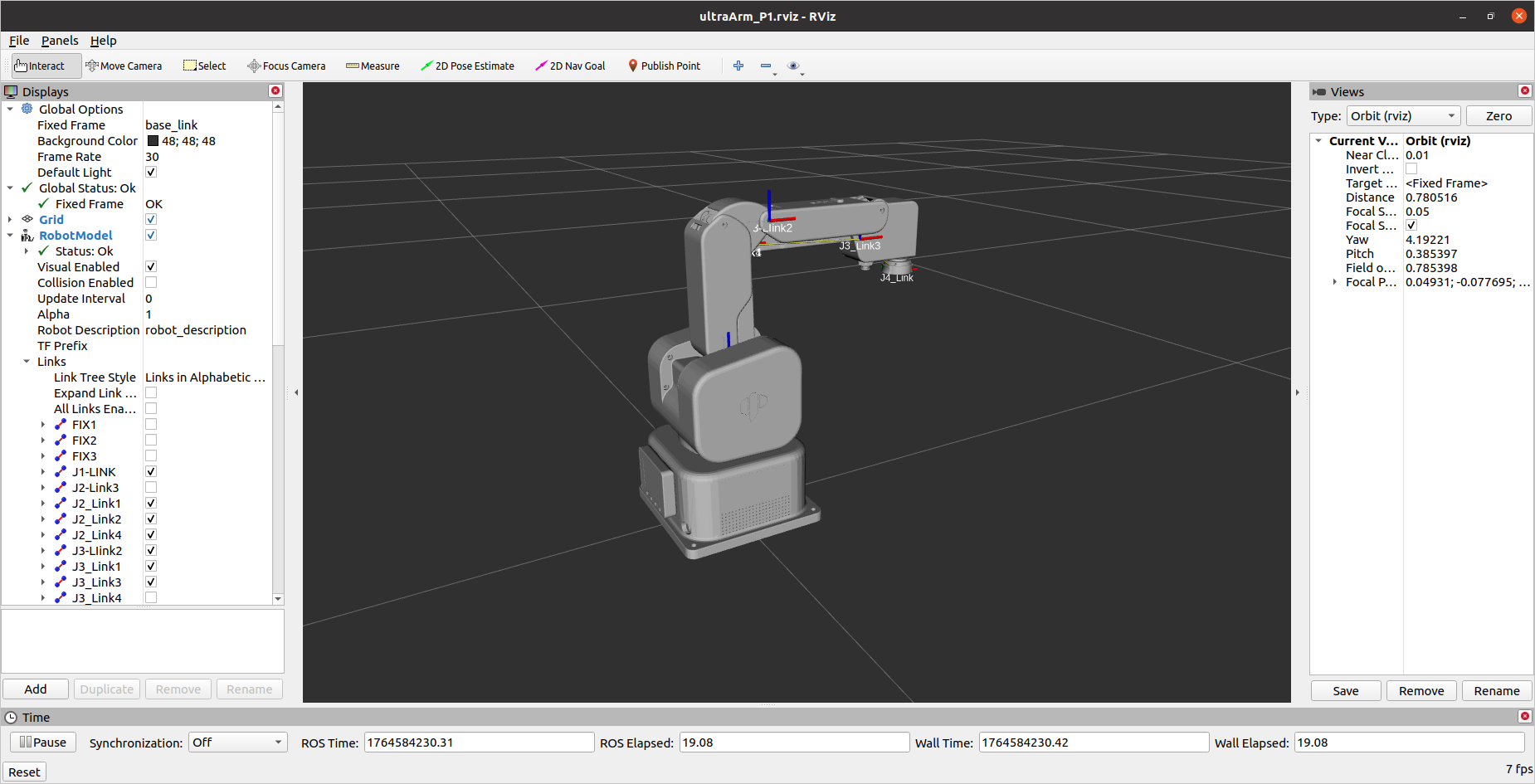
在 ultraarm_p1 软件包中添加了键盘控制功能,并在 rviz 中执行实时同步。 该功能依赖于 pythonApi,因此请务必与真正的机械臂连接。
打开命令行并运行:
# 默认串口名为"/dev/ttyUSB0",波特率为1000000.
roslaunch ultraarm_p1 teleop_keyboard.launch port:=/dev/ttyUSB0 baud:=1000000
运行效果如下
ultraArm 的信息将在命令行中输出如下:
SUMMARY
========

PARAMETERS
 * /mycobot_topics/baud: 1000000
 * /mycobot_topics/port: /dev/ttyUSB0
 * /robot_description: <?xml version="1....
 * /rosdistro: noetic
 * /rosversion: 1.16.0

NODES
  /
    mycobot_topics (ultraarm_communication/mycobot_topics.py)
    real_listener_topic (ultraarm_p1/listen_real_of_topic.py)
    robot_state_publisher (robot_state_publisher/robot_state_publisher)
    rviz (rviz/rviz)

ROS_MASTER_URI=http://localhost:11311

process[robot_state_publisher-1]: started with pid [135652]
process[rviz-2]: started with pid [135653]
process[mycobot_topics-3]: started with pid [135654]
process[real_listener_topic-4]: started with pid [135657]
Current pymycobot library version: 4.0.6b1+p1
pymycobot library version meets the requirements!
[INFO] [1764747322.418629]: /dev/ttyUSB1,1000000

UltraArm P1 Status
--------------------------------
Joint Limit:
    joint 1: -165 ~ +165
    joint 2: -18 ~ +85
    joint 3: +89 ~ +200
    joint 4: -179 ~ +179
然后打开另一个命令行运行:
rosrun ultraarm_p1 teleop_keyboard.py
你将看到命令行输出如下:
ultraArm P1 Teleop Keyboard Controller (ROS1 - Topic Version)
---------------------------------------------------------
Movement (Cartesian):
              w (x+)
    a (y+)    s (x-)    d (y-)
              z (z-)    x (z+)

Rotation (Euler angles):
    u (rx+)
    j (rx-)

Movement Step:
    + : Increase movement step size
    - : Decrease movement step size

Other:
    1 - Go to init pose
    2 - Go to home pose
    3 - Save current pose as home
    q - Quit

currently:    speed: 50    change percent: 5
[INFO] [1764747657.221866]: Current moving step: position 12.5 mm, angle attitude 9.0°
在该终端中,您可以控制机械臂的状态,并使用命令行中的按键移动机械臂。
注意:先输入2机械臂回到起始点之后,再进行其他坐标控制操作,终端会有如下提示:
[WARN] [1758001794.385321]: Coordinate control disabled. Please press '2' first.
[INFO] [1758001804.552778]: Home pose reached. Coordinate control enabled.
[INFO] [1758001817.069637]: Home pose reached. Coordinate control enabled.
[WARN] [1758001836.301070]: Returned to zero. Press '2' to enable coordinate control.
[WARN] [1758001848.830702]: Coordinate control disabled. Please press '2' first.
[INFO] [1758001863.383565]: Home pose reached. Coordinate control enabled.
[WARN] [1758001933.596504]: Returned to zero. Press '2' to enable coordinate control.
[WARN] [1758001942.051899]: Coordinate control disabled. Please press '2' first.
5 moveit 使用
mycobot_ros 整合了 MoveIt 部分。
打开命令行并运行:
roslaunch ultraarm_p1_moveit demo.launch
运行效果如下:
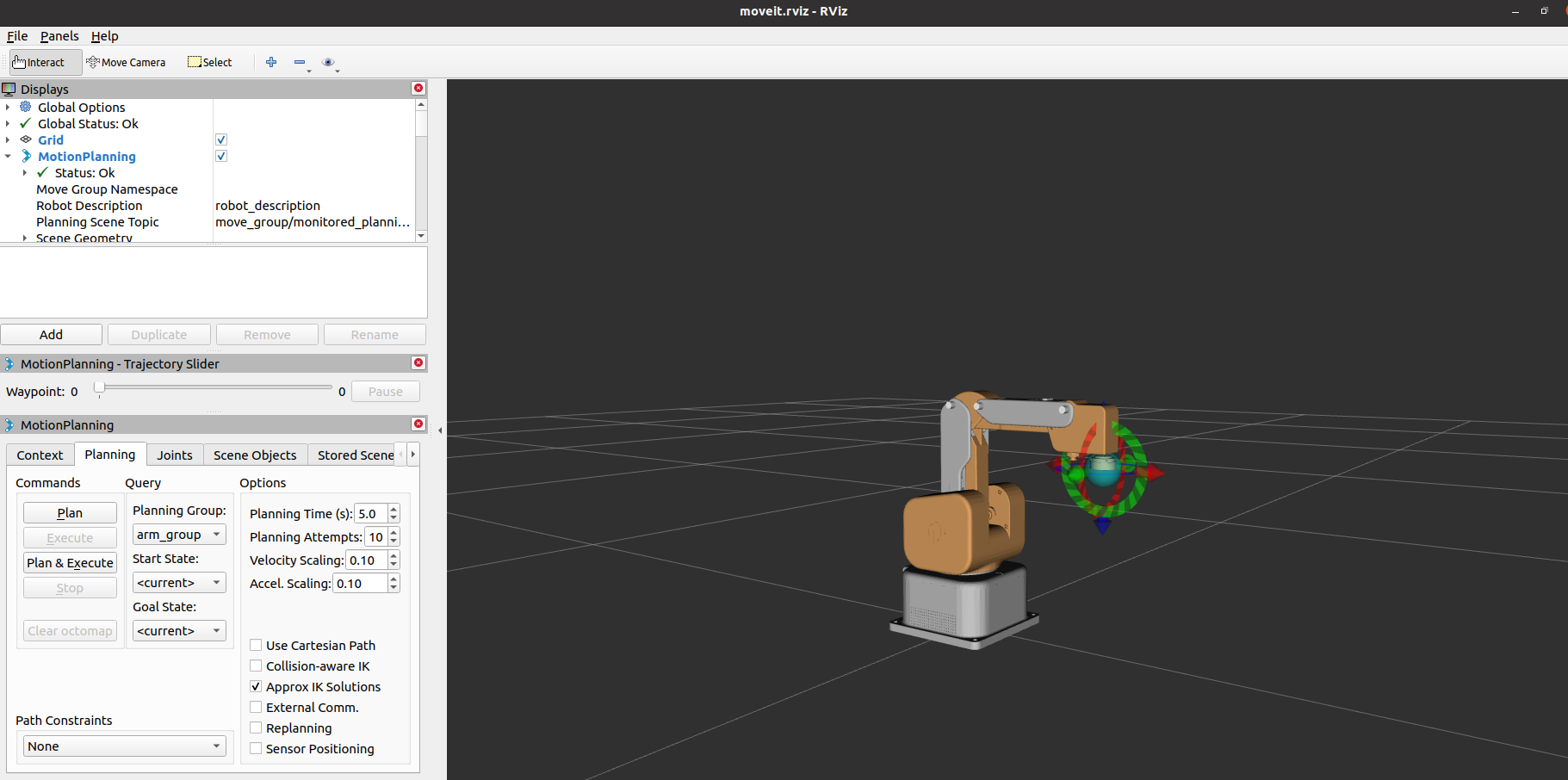
终端将输出如下信息,代表成功启动moveit:
[ INFO] [1764748767.950062231]: Using planning interface 'Pilz Industrial Motion Planner'
[ INFO] [1764748767.979214606]: Loading robot model 'firefighter'...
[ INFO] [1764748768.672492877]: Set joints of group 'arm_group' to pose 'init_pose'.
[ INFO] [1764748768.674325697]: Fake controller 'fake_arm_group_controller' with joints [ J1 J2 J3 J4 ]
[ INFO] [1764748768.676474671]: Returned 1 controllers in list
[ INFO] [1764748768.709682299]: Trajectory execution is managing controllers
[ INFO] [1764748768.709847401]: MoveGroup debug mode is ON
Loading 'move_group/ApplyPlanningSceneService'...
Loading 'move_group/ClearOctomapService'...
Loading 'move_group/MoveGroupCartesianPathService'...
Loading 'move_group/MoveGroupExecuteTrajectoryAction'...
Loading 'move_group/MoveGroupGetPlanningSceneService'...
Loading 'move_group/MoveGroupKinematicsService'...
Loading 'move_group/MoveGroupMoveAction'...
Loading 'move_group/MoveGroupPickPlaceAction'...
Loading 'move_group/MoveGroupPlanService'...
Loading 'move_group/MoveGroupQueryPlannersService'...
Loading 'move_group/MoveGroupStateValidationService'...
Loading 'pilz_industrial_motion_planner/MoveGroupSequenceAction'...
[ INFO] [1764748768.849945586]: initialize move group sequence action
[ INFO] [1764748768.871537834]: Reading limits from namespace /robot_description_planning
Loading 'pilz_industrial_motion_planner/MoveGroupSequenceService'...
[ INFO] [1764748768.903345564]: Reading limits from namespace /robot_description_planning
[ INFO] [1764748768.933101019]:

********************************************************
* MoveGroup using:
*     - ApplyPlanningSceneService
*     - ClearOctomapService
*     - CartesianPathService
*     - ExecuteTrajectoryAction
*     - GetPlanningSceneService
*     - KinematicsService
*     - MoveAction
*     - PickPlaceAction
*     - MotionPlanService
*     - QueryPlannersService
*     - StateValidationService
*     - SequenceAction
*     - SequenceService
********************************************************

[ INFO] [1764748768.934931311]: MoveGroup context using planning plugin ompl_interface/OMPLPlanner
[ INFO] [1764748768.935042611]: MoveGroup context initialization complete

You can start planning now!

[ INFO] [1764748772.433527325]: Starting planning scene monitor
[ INFO] [1764748772.438227267]: Listening to '/move_group/monitored_planning_scene'
[ERROR] [1764748773.125892638]: Group 'arm_group' has a mimic joint. Will not initialize dynamics solver
[ INFO] [1764748773.138298263]: Constructing new MoveGroup connection for group 'arm_group' in namespace ''
[ INFO] [1764748774.394846420]: Ready to take commands for planning group arm_group.
基本路径规划操作如下:
如果想让真正的机械臂同步执行计划,则需要打开另一个命令行并运行:
# 默认串口名为"/dev/ttyUSB0",波特率为1000000.
rosrun ultraarm_p1_moveit sync_plan.py _port:=/dev/ttyUSB0 _baud:=1000000
修改运动速度
为了防止关节在实际机械臂运动过程中晃动,需要降低关节的运动速度。
- 在
sync_plan.py文件中,修改机械臂 Python API 的速度参数,此处改为 25。
  ...

def callback(data: JointState):
    """Callback function for ROS JointState subscription.

    This function converts incoming joint positions (radians) to angles
    in degrees and sends them to the P1 robotic arm.

    Args:
        data (JointState): Joint state message containing joint positions.
    """
    data_list = []
    for _, value in enumerate(msg.position):
        radians_to_angles = round(math.degrees(value), 2)
        data_list.append(radians_to_angles)
    joint1 = data_list[0]
    joint2 = data_list[1]
    joint3 = data_list[5] + 90
    joint4 = data_list[-1]
    angles_list = [joint1, joint2, joint3, joint4]
    self.ua.set_angles(angles_list, 25, _async=False)

  ...
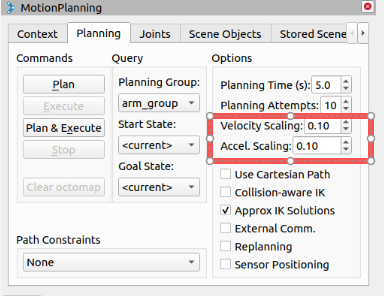
在 Moveit RViz 界面中,修改速度和加速度的缩放比例。在这里,将其改为 0.1,然后保存当前配置。